One scrim tells you very little. You won 13-7 on Haven: was it your new setup, or a tired opponent? Ten scrims on the same map, logged the same way, start to tell you something, for example that you win 70% of your defense rounds, 40% of your attack rounds, and that your pistols are a coin toss.
Getting there takes two minutes after each scrim and a sheet that doesn't change shape every week. This guide says what to record, gives you the sheet with its formulas, and covers the traps in reading the numbers.
Why log scrims at all
- Memory is a bad scorer. Everyone remembers the clutch in round 24. Nobody remembers losing four attack rounds to the same rush.
- Small samples lie. A single map depends on the opponent, the evening, who was tired. A trend over eight to ten scrims on a map is worth discussing; one result isn't.
- It decides what you practice. A log turns "we feel weak on attack" into "we won 31% of our attack rounds on Lotus over six scrims", which tells you where the next practice block goes.
What to record, at three levels
The match (every scrim, two minutes)
| Field | Why |
|---|---|
| Date, opponent, opponent's level | A result means more against a team of your level |
| Map | Every number below is read per map |
| Side you started on | Some teams start stronger than they finish |
| Rounds won and played on attack, on defense | The split tells you more than the final score |
| Pistol 1 and pistol 2 (won or lost) | Pistols swing several rounds each |
| Final score | For the record |
| Both comps | So you can compare like with like later |
| Who played | A sub changes the team |
| The goal, and whether you met it | The reason you scrimmed (see our scrims guide) |
The players
From the end-of-game scoreboard, for each of your players: agent, the game's score, kills, deaths, assists, first bloods, plants and defuses.
A word on the score. Patch 13.06 (22 September 2026) replaced Average Combat Score (ACS) with Performance Score, a 0 to 500 score, in Competitive, Unrated, Swiftplay and Premier. Riot's notes don't say what custom games show: check your own end-of-game screen and log what it displays. Two rules follow:
- Keep the score type in its own column, and never average ACS with Performance Score: they are different scales.
- Note the patch. Riot adjusted the Performance Score formula again in patch 13.08 (13 October 2026), so scores from before and after a formula change aren't strictly comparable either.
The rounds (only the ones you flagged)
Don't write notes for 24 rounds. Flag three to five rounds during the debrief with a line each, and work through them in your next review (see how to run a team VOD review).
The sheet (copy it)
Two tabs are enough: one row per map played in Matches, one row per player per map in Players. Download them as CSV files and import them into Google Sheets, Excel or LibreOffice:
- Matches tab (CSV): date, opponent, map, side started on, attack rounds won and played, defense rounds won and played, pistol 1, pistol 2, final score, comps, players, goal, goal met, notes.
- Players tab (CSV): date, opponent, map, player, agent, score, score type, kills, deaths, assists, first bloods, plants, defuses.
Each file has one example row, marked as fictional: delete it once your first real scrim is in.
Formulas
With the Matches tab laid out as in the file (map in column C, attack rounds won and played in E and F, defense in G and H, pistols in I and J), put these anywhere in a summary tab. Replace "Haven" with the map you want, or point to a cell that holds the map name.
Scrims logged on a map:        =COUNTIF(Matches!C:C,"Haven")
Attack round win rate on it:   =SUMIF(Matches!C:C,"Haven",Matches!E:E)/SUMIF(Matches!C:C,"Haven",Matches!F:F)
Defense round win rate on it:  =SUMIF(Matches!C:C,"Haven",Matches!G:G)/SUMIF(Matches!C:C,"Haven",Matches!H:H)
Pistol win rate, all maps:     =COUNTIF(Matches!I2:J500,"W")/(COUNTIF(Matches!I2:J500,"W")+COUNTIF(Matches!I2:J500,"L"))
And on the Players tab (player in column D, kills in H, deaths in I, first bloods in K):
K/D of a player:               =SUMIF(Players!D:D,"Player 1",Players!H:H)/SUMIF(Players!D:D,"Player 1",Players!I:I)
First bloods per map played:   =SUMIF(Players!D:D,"Player 1",Players!K:K)/COUNTIF(Players!D:D,"Player 1")
Format the rate cells as percentages. If your spreadsheet uses a comma as the decimal separator (French settings, for example), replace the commas between arguments with semicolons.
Reading the numbers without fooling yourself
- Count before you conclude. Under about five scrims on a map, treat the numbers as anecdotes. This threshold is our rule of thumb, not a statistic.
- Read the attack and defense split, not the final score. 13-11 can hide a 9-3 defense and a 4-8 attack.
- Don't judge a player by K/D alone. An entry player who dies first while making space is doing the job; a Sentinel with a high K/D may be playing too passively. Look at first bloods, plants, defuses and the role together.
- Write down the opponent's level. A 13-3 against a much weaker team isn't progress.
- Compare like with like: same map, same comp, same score type, ideally the same patch.
When you have about eight scrims on a map, this table is a starting point for the conversation (our suggestion, not a rule):
| What the log shows | What it suggests | What to try |
|---|---|---|
| Attack win rate well below defense | Your executes or entries don't work | Review three lost attack rounds, change one execute, test it in the next scrim |
| Defense well below attack | Setups or rotations | Try another setup on the weak site, check rotation calls in review |
| Pistols lost most of the time | No shared pistol plan | Give the next practice its first 20 minutes on pistol plans for both sides |
| The same player dies first in most rounds | Role or positioning, or a plan that sends them in alone | Look at those rounds with the player and the staff, not in front of everyone |
Do public trackers show your scrims?
We couldn't confirm from reliable sources whether third-party stats sites list custom games. Test it rather than trusting a forum post: after a scrim, look up one of your players' Riot ID on the tracker you use and see if the game is there. If either team asked for it, the lobby may also have used the Hide Match History setting.
Capturing the scoreboard
The end-of-game scoreboard holds everything for the Players tab. Take one screenshot per map, before leaving the game:
- the whole scoreboard visible, both teams, every column;
- not cropped, not scaled down, so every number is readable;
- the map name and score visible if your screen shows them.
On Windows, Print Screen or the snipping shortcut (Windows + Shift + S) is enough.
That screenshot shows the other team's names. If you share it outside your team, crop or blur them.
Typing it in, or reading it from the screenshot
Typing one map is about 80 numbers for your five players. It takes a few minutes and costs nothing, but typos creep in, and a log with gaps stops being useful. A tool that reads the screenshot is faster; whichever you use, check every row before it goes into the sheet.
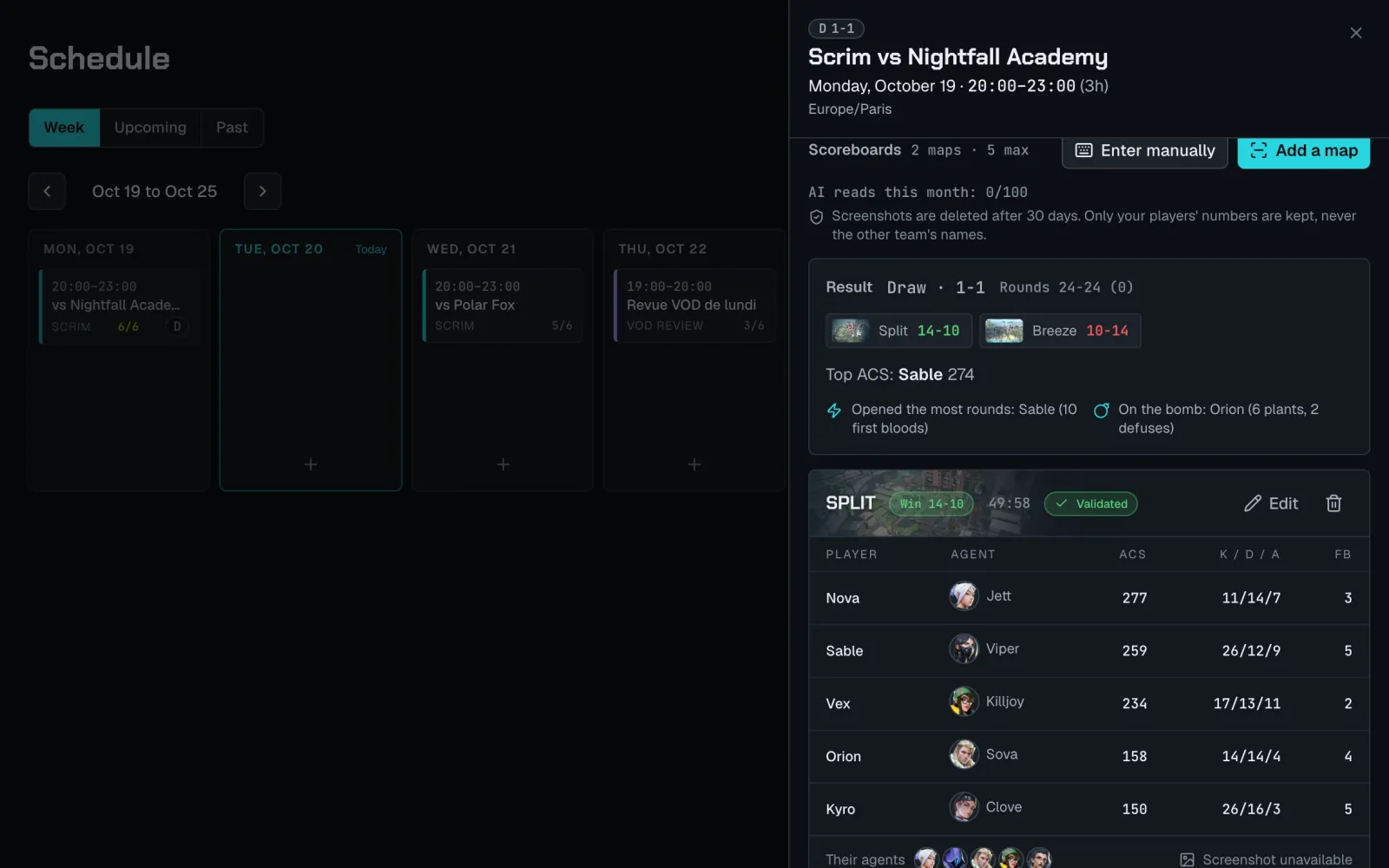
In Staq
In Staq you upload the scoreboard screenshot on the scrim: the AI reads each row, flags the ones it's unsure about, and you check them before saving. Screenshots are deleted after 30 days and only your team's rows are kept. ACS and Performance Score stay separate scales, so a trend never mixes them. The free plan gives 10 reads a month and 7 days of stats history; Pro gives 100 reads a month and keeps the whole season.