Premier is Riot's in-game competition for teams: you play weekly matches against teams of a similar level, and a good Stage takes you to the playoffs. Creating the team takes two minutes in the client. Most problems come later: a name you can't change, a player you can't add because the division is locked, a match night where only four can play.
This guide covers the rules that matter when you create the team, then how to run it from week to week. The rules below were checked on 20 October 2026 against Riot's support article Creating and managing a Premier team. Riot changes Premier between Acts: when in doubt, the support article and the Premier tab in the client win over any guide, this one included.
Before you start: the eligibility checklist
Every player on the roster has to meet these conditions. Check them with your five before anyone clicks "create".
| Rule | What it means for you |
|---|---|
| Verified account | Each player's Riot account must be verified. |
| At least one ranked placement | Each player must have completed ranked placements at some point. |
| One roster at a time | A player can be on only one Premier team. Someone still on an old team has to leave it first. |
| No recent behavior penalty | A behavior penalty or restriction makes a player ineligible for 30 days from its start. A penalized player stays on the roster but can't queue for the rest of the current Stage. |
| 5 to 7 players | A Premier team has between 5 and 7 players. |
What changed since 2023
Many guides were written for Premier's launch and still talk about enrollment windows. Riot's current support article says no enrollment is required: you can create a team and start playing at any point during a Stage.
Creating the team
Team creation starts from the Premier tab in the client. Three choices there are hard to undo.
The name and the tag. The team name is 5 to 15 characters, the tag 1 to 5. Neither can be changed once you leave the Create Team window. The only way to change them later is to delete the team and create a new one. Agree on both with the roster before you open the window, and check the spelling twice. The owner can change the logo and colors at any time, so don't spend long on those.
The zone. You choose a zone when you create the team. You can still change it until your first match; after that it is locked. Pick the zone where your five actually play from: the wrong zone means worse ping on every match of the Stage.
Who creates it. The creator becomes the owner. Read the next section before deciding who that is.
Owner and captain: who should hold which
A Premier team has one owner and one captain.
| Owner | Captain | |
|---|---|---|
| Invite and remove players | Yes | Yes, anyone except the owner |
| Assign the captain | Yes | No |
| Transfer ownership | Yes | No |
| Delete the team | Yes, only the owner | No |
| Change logo and colors | Yes | No |
Two practical rules follow from that table.
- The owner should be the person most likely to stay, not necessarily the best player or the IGL. The owner doesn't have to play every match. If the owner leaves without transferring ownership, it goes to the member who has been on the team longest, which may not be who you want.
- The captain should be whoever organizes: the person who invites subs, chases answers and knows who is free on match night.
On match night, the party leader queues and locks the map picks and bans. Decide in advance who leads the party, so you don't sort it out with the timer running.
Choosing your 5 to 7 players
Invite your strongest five before the first match
Your provisional division comes from the average MMR of your top five players (a large skill gap can place the team higher). The division locks after your first match. From then on, players who would change your division can't be invited, or added back if they were removed.
So if a strong player is "joining next week", either wait for them before your first match or accept that they may not be able to join this Stage.
Subs: why a sixth and seventh player matter
Each team, and each player, can play at most two matches per week. A player who has already played two matches that week, even for another team, is done until the next week.
A sixth player covers the evening someone can't make it. A seventh covers the week two people are away, or a player who picked up a behavior penalty and can't queue for the rest of the Stage. The cost: subs need to know your defaults and your calls, so bring them to scrims too, not only to official matches.
A weekly routine for a Premier team
Each Premier week is played on one map, and the match windows for your zone are shown in the client. Build the rest of the week around them. This is our suggestion for a team that can give four evenings:
| When | What | Why |
|---|---|---|
| Start of the week | 45-minute VOD review of last week's matches | Pick one or two things to fix, not ten |
| Evening 2 | Scrim on this week's Premier map | Test your plan against a real opponent |
| Evening 3 | Practice on the map: setups, retakes, the pistol plan | Fix what the scrim showed |
| Match nights | Premier matches, inside your zone's windows | Arrive 20 minutes early, warm up together |
Since the map is the same all week, every scrim that week should be on it. If you don't know how to set a scrim up, our scrims guide has the message templates.
Finding the nights when five can play
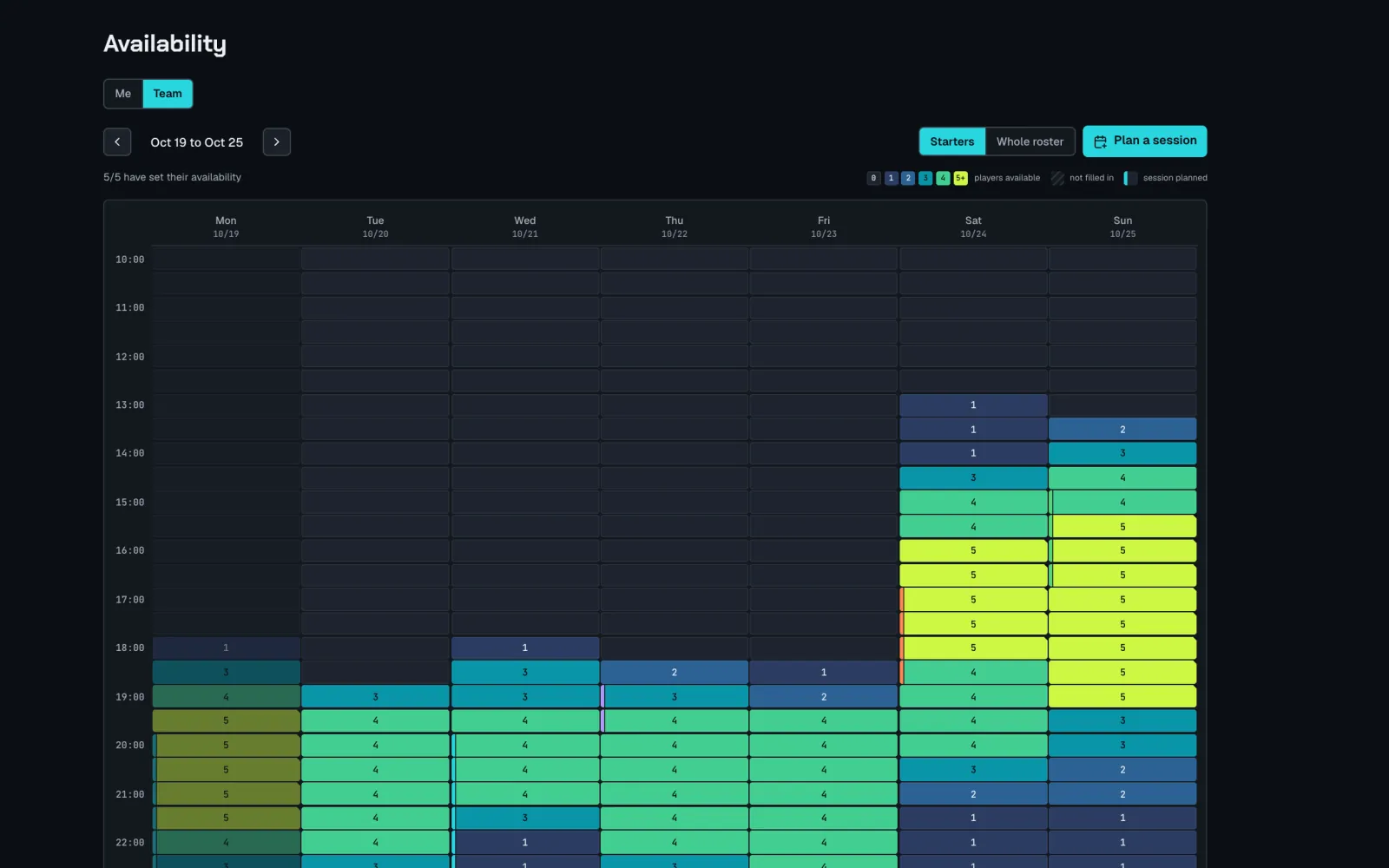
The routine above only works if you know who is free. A shared sheet works for five people: one row per player, one column per evening, and everyone fills in their usual week. It starts to break when the roster grows to seven, when one player's week changes, or when nobody remembers to update it.
Whatever tool you use, ask for the usual week, not for every date. Players fill it in once, then only correct the exceptions. The evenings where all five starters are free are your match and scrim nights; the ones where four are free tell you when a sub matters.
Common mistakes
- Creating the team before agreeing on the name. It can't be changed without deleting the team.
- Playing the first match with a weaker lineup while the best player is away. The division locks on that match.
- No sub. One absence and you either forfeit or play four against five.
- Nobody owns the schedule. The captain should confirm the match nights at the start of each week, not on the day.
- The owner leaves without transferring ownership. It goes to the longest-standing member automatically. Transfer it first.
- Following an old guide. Enrollment windows and dates from 2023 articles no longer apply. Check the support article and the client.
A checklist to send to a new player
Joining our Premier team: before your first match
- Riot account verified
- Ranked placements done at least once
- Not on another Premier team (leave it first)
- No active behavior penalty
- Your usual week sent to the captain (evenings you can play)
- You know the match nights and you're online 20 minutes before
Where the official rules live
The two references that stay current are Riot's support article on creating and managing a Premier team and the Premier tab in your client, which shows the Stage, the weekly map and your match windows. Dates, map order and playoff conditions change from Stage to Stage: take them from there, not from a blog post.
Contender and Invite divisions have extra rules. Only players with Contender Eligibility can be added there: in the current or previous Stage, they played a weekly or playoff match for a Contender or Invite team, reached a peak rank of Immortal 3 or higher in Competitive, or played in the Elite 5 playoff.
In Staq
A Premier roster of 5 to 7 players fits Staq's free plan, which goes up to 12 members. Each player sets their usual week once, and the team heatmap shows the evenings when all of them are free; you plan the match nights and scrims on the schedule and everyone answers. Staq doesn't connect to Riot accounts or to Premier: your match windows and the weekly map come from the client.